Cabling the Serial Interface to a PC
The device provides an RS-232 serial interface port on its rear panel. The RS-232 interface port is used to access the device's command line interface (CLI).
Cabling specifications:
| ■ | Cable: Straight-through, Category (Cat) 5, 5e or 6 |
| ■ | Connector: Standard RJ-45 |
| ■ | Connector Pinouts: |
RJ-45 Connector Pinouts
|
Pin |
Signal |
|---|---|
|
1 |
Not used |
|
2 |
Ground (GND) |
|
3 |
Transmit Data (TXD) |
|
4 |
Not used |
|
5 |
Not used |
|
6 |
Receive Data (RXD) |
|
7 |
Ground (GND) |
|
8 |
Not used |
| ➢ | To connect the device's serial interface port to a PC: |
| 1. | Connect the RJ-45 connector at the end of the cable to the device's serial port, located on the rear panel and labeled CONSOLE. |
Cabling Serial Port
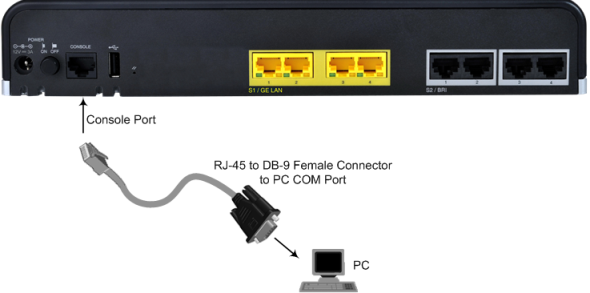
| 2. | Connect the other end of the cable (e.g., 9-pin DB connector) to the COM RS-232 communication port on your computer. |